Amazon A+ Content Design for Books: Sizes, Modules, Examples
The product page, upgraded

Amazon A+ content design, for books.

Amazon A+ content is the visual section below the fold on a product page — image modules at Amazon's exact sizes that replace the wall of plain text. Every KDP author can add it free from the KDP dashboard, and Amazon's own guidance credits it with a measurable sales lift. Here is every module and its exact size, what good A+ design does for a book, and how to get modules built from your actual manuscript instead of a generic template.

The spec sheet

Every standard module, exact sizes.

Amazon rejects images at the wrong dimensions, so design starts with the spec. These are the standard A+ modules available to KDP authors (up to five modules per book page):

Standard Image Header with Text970 × 600 px. The banner most book pages lead with — the widescreen mood shot with your hook line over it. This is the module readers actually see first.
Standard Single Image & Sidebar300 × 400 px main + 350 × 175 px sidebar. Good for a character or setting image beside a short "inside this book" column.
Standard Three Images & Text300 × 300 px each. The classic row of three — three characters, three books in the series, or three reasons to read.
Standard Four Image & Text Quadrant220 × 220 px each. Four tiles with short captions — tropes, quotes, or the series lineup.
Standard Comparison ChartUp to six columns, 150 × 300 px images. Made for series: book 1 to book 6 side by side, each column linking to its own page. The single best readthrough tool in A+.
Standard Company Logo600 × 180 px. Your imprint or pen-name brand mark. Small, but it makes a self-published page read like a publisher's.

Design rules that survive contact with real shoppers: build for mobile first (most Amazon book browsing happens on a phone, where 970-wide banners shrink to palm size), keep overlay text large and short, and make every module look like it belongs to the same book — same palette, same type, cover-consistent.

Real examples

What finished A+ modules look like.

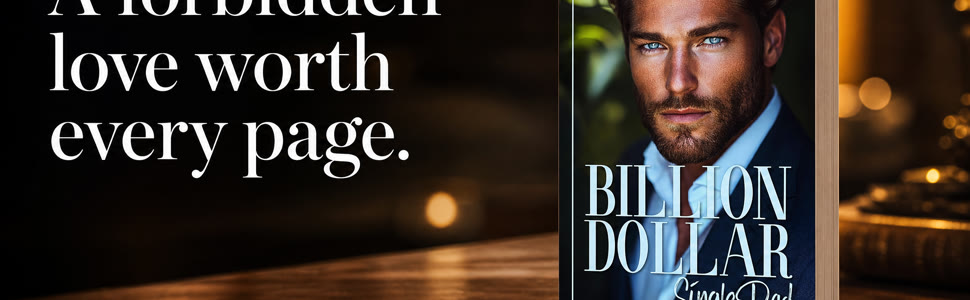
These are real A+ modules — header, banner and tile — generated from the manuscript of one of our own pen-name books, at Amazon's exact sizes. Not a template with stock photos dropped in: the scenes, the characters and the lines all come from the actual book.

Amazon A+ content design example for a book — header module at Amazon's 970x600 size Amazon A+ content design example — wide banner module built from the book's own scenes Amazon A+ content design example — tile module at Amazon's exact size
Header, banner and tile modules from one manuscript. Upload ready — sized, named and sequenced for the KDP A+ Content editor. See a full campaign walkthrough with the A+ set in context.
The honest landscape

Template tools vs built from the book.

Canva & template packs

Canva has A+ templates at the right sizes, and for a designer-author with good stock images and an afternoon, they work. The limit is the source material: templates are generic frames, so most template A+ ends up as the same beach-and-serif look every other book has — and nothing in it comes from your story.

Freelance designers

A good freelancer produces polished modules, typically in days and at per-project rates. Quality tracks the brief you write: the designer hasn't read your book, so you supply the scenes, the quotes and the mood — or you get generic-pretty.

Doing it yourself

Free, and fine for a plain header with your cover art. The trap is the spec (wrong sizes get rejected) and the time — six modules at six different dimensions is a real design project, repeated for every book in the series.

Book Ad Pack

We read the actual manuscript, then generate the module set from it — characters, scenes and hook lines from the book, sized to Amazon's spec, upload-ready. It ships inside the same pack as the ad creative, so the ad a reader clicks and the page they land on tell one story.

Fair questions

A+ content, asked often.

What is Amazon A+ content for books?

A+ content is the "From the Publisher" visual section on a product page — image and text modules that appear below your book's blurb. For books it typically carries the mood of the story, the series lineup, review pull-quotes and character art, doing the selling the plain-text blurb can't.

Is A+ content free for KDP authors?

Yes. Every KDP author can add standard A+ content free: KDP dashboard → Marketing → A+ Content. You don't need Brand Registry (that's the path for non-KDP sellers). Premium A+ is a separate program aimed at vendors and isn't the KDP author path.

What size are Amazon A+ content images?

Each module has its own spec: the Image Header with Text is 970×600 px, Single Image & Sidebar is 300×400 plus 350×175, Three Images & Text is 300×300 each, the Four Image Quadrant is 220×220 each, Comparison Chart images are 150×300, and the logo module is 600×180. Amazon rejects wrong-sized uploads, so build to spec from the start.

Does A+ content actually increase book sales?

Amazon's own published guidance credits basic A+ content with a sales lift of up to around 8%. For advertised books the effect compounds: A+ makes the product page keep the promise the ad made, which is where paid clicks are otherwise lost. It's the cheapest conversion upgrade a book page can get.

Can I make A+ content in Canva?

Yes — Canva has correctly sized A+ templates, and they're a fair DIY route if you have strong images of your own. What a template can't supply is material from your actual book; that's the difference between decoration and selling. If your A+ could sit on any book's page, it isn't working.

Keep reading

The rest of the launch kit.

Where our numbers come from

Counted, not claimed.

Why this comes from real data

Book Ad Pack is not a template library. Every pack is generated from the manuscript and checked against a reader-demand database we build and count ourselves: 725,746 hook mentions pulled from reader reviews, 5,344 reader personas, and 271,339 Amazon rank and price snapshots. The pipeline has built 76 complete packs across 13 subgenres, 53 of them on paid orders, including 255 ad creatives and 64 scene videos. Counts are live table counts taken 25 August 2026; they go up, not down. Compared with pinterest.com, which ranks first for “amazon a+ content design”: Pinterest shows you other people’s A+ panels for inspiration. We have built 67 Amazon A+ modules (166 sized images) from authors’ actual books, each checked against the counts above. See how we compare with Canva, Placeit and BookBrush.

Your book next

A+ modules from your manuscript.

Upload the manuscript or paste your Amazon link — we read the actual book, then show you the plan.